DCP Proxy User Manual

A free local gateway for OpenAI-compatible AI backends (llama.cpp, LM Studio, vLLM, Z.AI, and others). DCP Proxy sits between your AI coding agent and the engine and shrinks conversation history on the fly, so long agent sessions keep fitting in context without losing the details that matter.

DCP Proxy modifies request bodies in transit (dedup, pruning, summaries). If a summarize call fails, requests are forwarded uncompressed — nothing is ever dropped.
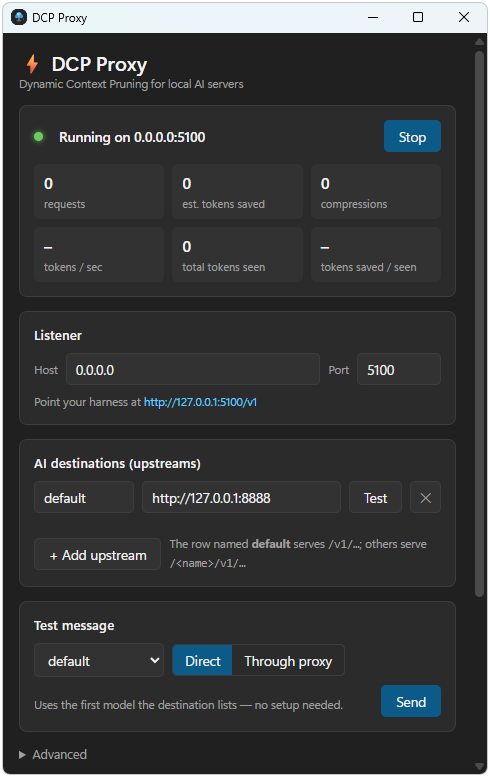
Download DCP-Proxy.exe (5.2 MB) DCP Proxy user interface screenshot

Application Overview

DCP Proxy is a small local proxy for the OpenAI chat-completions API. Every request your AI coding agent sends passes through these stages:

  • Identical tool calls are deduplicated: when the same call (same name and arguments) runs several times, only the newest result is kept; older copies become a short placeholder.
  • Old error outputs are trimmed: stale failed tool outputs older than the recent tail are cut to a short prefix.
  • Huge tool outputs are pruned: outputs larger than the prune window keep a head and a tail of verbatim content.
  • Old thinking traces are stripped: previous turns' chain-of-thought is removed — engines never need it back.
  • LLM compression: when the history grows past the threshold, the model itself summarizes it into a structured, lossless-biased summary.

Your API keys stay in your client. The proxy forwards the Authorization header untouched and never stores it.

Getting Started

  1. Download DCP-Proxy.exe from digit.solutions and unzip it.
  2. Run DCP-Proxy.exe. The window hides to the tray when closed; right-click the tray icon to exit.
  3. Press Add upstream and enter your engine's base URL, for example http://127.0.0.1:8888 (llama.cpp), http://127.0.0.1:1234/v1 (LM Studio), or a path-style provider URL.
  4. Use Test connection (probes /v1/models) and Send test message to verify the chain.
  5. Point your client's OpenAI base URL at the proxy: http://127.0.0.1:5100/v1.
  6. Start a session. Compression turns on automatically when the history is large enough.

That's the whole setup — the proxy is transparent to clients and engines.

Upstreams and Routing

  • Default upstream: client paths like /v1/... go to the upstream named default.
  • Named upstreams: http://host:5100/<name>/v1/... routes to that upstream with the prefix stripped.
  • Header override: send X-DCP-Upstream: <name> to pick the upstream per request.
  • URL fixing: the proxy collapses // and /v1/v1, adds a missing /v1 for known endpoints on root-mounted bases, and strips a stray /v1 for path-style bases — so any base-URL shape works.
  • Health: GET /health returns status plus counters (requests, saved est. tokens, compressions).

Token-Saving Transforms

Transforms only touch messages older than the recent tail (the last 6 by default). The tail is always forwarded verbatim.

  • Dedup: identical tool calls (same name + arguments) keep only the newest output.
  • Error purge: old tool outputs that look like errors are cut to a 200-char prefix.
  • Prune: old tool outputs over the prune window (6000 chars) become head + tail (1500 + 1500 chars), with the original size noted.
  • Reasoning strip: reasoning_content / reasoning fields are deleted from old assistant messages (on by default; disable with "stripReasoning": false).

Multimodal (image) messages are never summarized away, and image endpoints (/v1/images/*) are never inspected.

LLM-Driven Compression

When the prunable span (everything except the recent tail) exceeds the threshold, the proxy asks the same model to summarize it and sends the client's leading system prompts, the summary, and the messages since:

  • Structured summaries: the model must fill sections — Task, Constraints, User Turns, Files, Decisions, Execution Anchors, State — preserving file paths, error strings, commands and every user instruction verbatim.
  • Fold-forward caching: the summary is cached per conversation and only refreshed after every few new messages; between refreshes the cached summary is substituted instantly.
  • Branch safety: if the client's history before the summary changes (branching, client-side compaction), state resets and re-summarizes.
  • Fail-open: if the summarize call fails, the request is forwarded uncompressed.
  • Thinking models: the summarize call asks for thinking off; if the engine returns empty content anyway, the reasoning text itself is used.

Visibility: log line, X-DCP-Compressed response header, and an optional one-line notice in the response's reasoning channel (disable with "notify": false).

Config Knobs

Managed by the GUI or hand-edited in config.json next to the executable:

compressThreshold — est. tokens in the prunable span before first compression (default 50000).

compressEvery — new messages between re-compressions (default 5).

summaryMaxTokens — max tokens for summarize calls (default 2000).

fidelity — "high" (default, lossless-biased) or "compact" for tighter pruning and terser summaries.

stripReasoning — strip old thinking traces (default true).

contextWindow — model context size; if set, the compression threshold auto-caps at 75% of it.

Compact fidelity trades detail for context space: prune window 2500 chars (head/tail 400), keep-last 4 messages, summary default 1200 tokens. Explicit knobs always win over the preset.

The GUI

  • Upstreams: add/remove named engines; the first is default.
  • Behaviour: compression notice injection on/off.
  • LLM compression: fidelity preset, threshold, re-compress cadence, summary max tokens, context window, reasoning strip.
  • Windows: start-with-Windows (hidden to tray).
  • Diagnostics: live tok/s readout and a request log (dcp-proxy-gui.log) — first stop for any routing question.

Privacy and Keys

  • API keys live only in your client. The proxy forwards the Authorization header untouched and never stores it.
  • The proxy runs locally; no telemetry, no accounts, no external services.
  • Summaries are produced by the same engine your client already talks to — the proxy adds no third parties.

Troubleshooting

  • Client can't connect: check the port in the GUI and that the proxy is running (tray icon).
  • Engine not reached: use Test connection; check dcp-proxy-gui.log for the reconstructed URL.
  • Wrong upstream: confirm the base URL shape (/<name>/v1) or the X-DCP-Upstream header.
  • Summaries never trigger: history is below the threshold; lower compressThreshold to test.
  • Poor summary quality: keep fidelity on high, raise summaryMaxTokens, or set contextWindow so compression triggers earlier.
  • "Unknown publisher" on launch: the executable is signed with the author's certificate; Windows may still prompt the first time.

Best Practices

  • Set contextWindow to your model's real context size and let the proxy manage thresholds.
  • Keep fidelity on high for coding agents; switch to compact only when context space is tight.
  • Leave reasoning stripping on — engines never need old chain-of-thought back.
  • Watch saved est. tokens on /health to confirm savings.
  • If a session misbehaves, disable compression temporarily by raising the threshold and compare.